Inventory
Inventory covers stock movement, replenishment, purchasing, depreciation, adjustments, balances and movement history. In IMS 9.4.4, Purchases also records VAT/tax details when VAT is enabled.
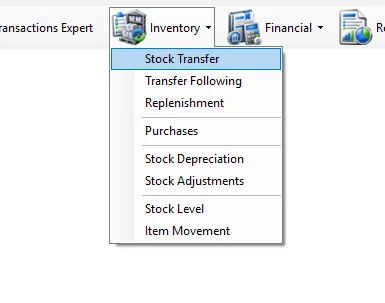
Inventory menu
| Module | Purpose |
|---|---|
| Stock Transfer | Create and manage stock transfers between IMS locations. |
| Transfer Following | Receive transferred stock, record actual quantities and review variances. |
| Replenishment | Use recent sales and available stock to prepare replenishment transfers. |
| Purchases | Record supplier purchases and returns, calculate landed cost and finalize inventory. |
| Stock Depreciation | Write off inventory that should no longer remain available for sale. |
| Stock Adjustments | Apply approved positive or negative stock corrections. |
| Stock Level | Analyze current or historical inventory quantities, cost and retail value. |
| Item Movement | Trace one item's chronological movement through purchases, transfers, sales and stock corrections. |
Current guide
01
Stock TransferCreate store-to-store transfer vouchers by scanning, searching or importing items; review balances/photos; save or save and print.
02
Transfer FollowingReceive incoming transfers, scan actual quantities, reconcile variances and finalize receiving.
03
ReplenishmentAnalyze recent sales and available stock, then prepare a Stock Transfer for replenishment.
04
PurchasesCreate purchase invoices and returns, calculate landed cost, finalize inventory/cost and financially post completed transactions.
05
Stock DepreciationWrite off unusable inventory at current cost and financially post the write-off.
06
Stock AdjustmentsApply signed positive or negative inventory corrections and post negative discrepancies when required.
07
Stock LevelAnalyze current or historical inventory by store and merchandise dimensions with quantity, cost and retail values.
08
Item MovementTrace one SKU chronologically through opening balance, purchases, transfers, sales, returns, depreciation and adjustments.