
System
System contains IMS user/security administration, settings, workstation authorization, diagnostics and update functions. IMS 9.4.4 uses the global user identity model while keeping operational permissions and data scope company-specific.
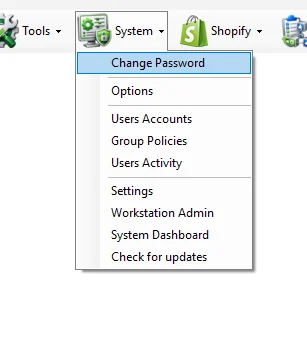
System menu
| Module | Scope |
|---|---|
| Change Password | Confirm the current user's password and set a replacement password. |
| Options | User/application options and preferences. |
| Users Accounts | Maintain IMS user accounts. |
| Group Policies | Maintain role/group permissions and access rules. |
| Users Activity | Review recorded IMS user activity. |
| Settings | Maintain system-level IMS configuration. |
| Workstation Admin | Manage authorized IMS workstations. |
| System Dashboard | View application/database/HA health, sessions, workstations and recorded transaction performance. |
| Check for updates | Check the IMS client for an available application update. |
Current guide
01
Change PasswordConfirm the current password, then enter and confirm a replacement password.
02
OptionsReview user/application options and workstation preferences.
03
Users AccountsMaintain IMS Global user identity and current-company access, permissions and profile settings.
04
Group PoliciesMaintain role/group permissions and access rules.
05
Users ActivityReview recorded IMS user activity.
06
SettingsMaintain system-level IMS configuration, including the company VAT switch and sales VAT parameters.
07
Workstation AdminManage authorized IMS workstations.
08
System DashboardReview application/database/HA health, sessions, workstations and recorded transaction performance.
09
Check for updatesUnderstand IMS update availability, critical-update behavior and the client update flow.