
Points Status
Applied
The loyalty transaction is no longer pending and has been applied to the rewards history.
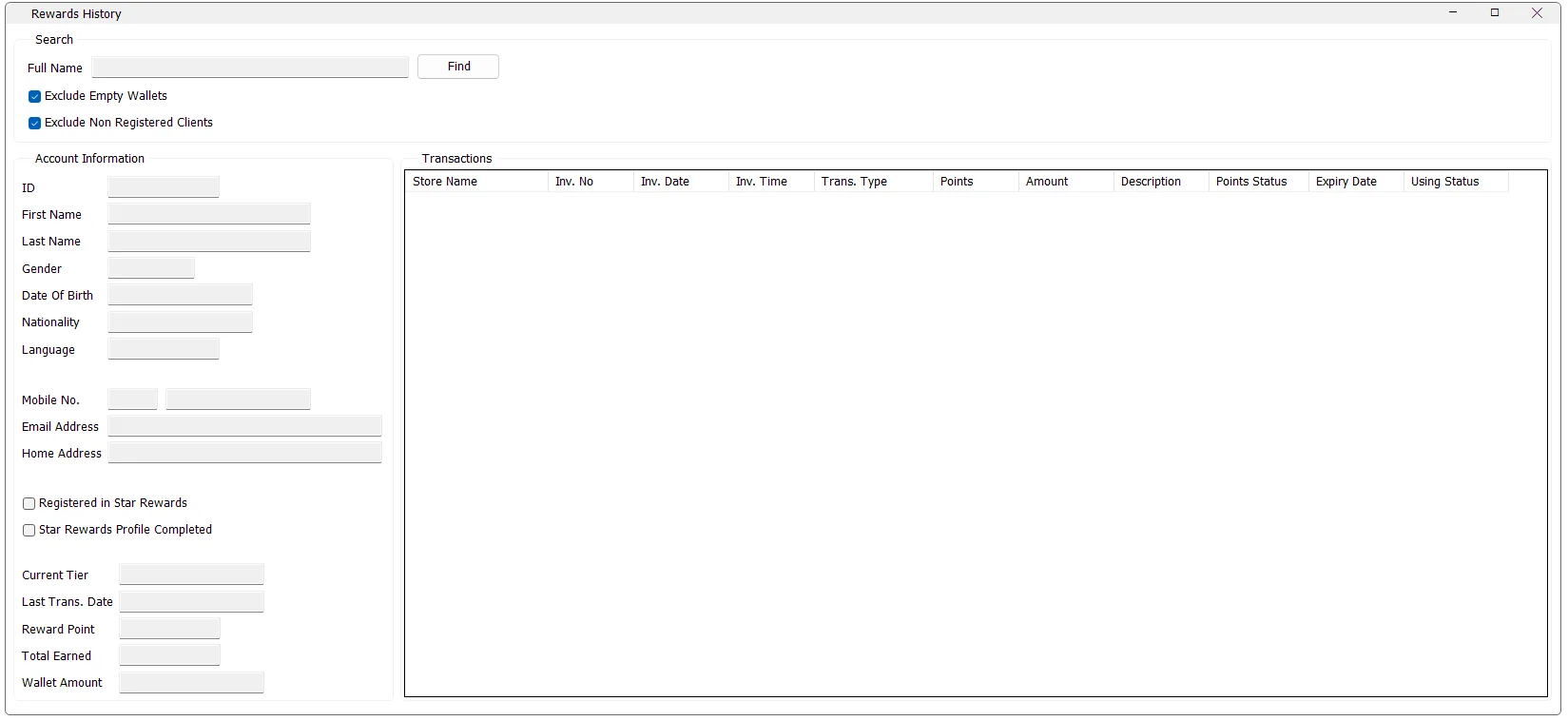
Star Rewards History is the loyalty-account enquiry screen in IMS. It lets an authorized user find a client, review the client's account and profile information, see the current tier, reward points and wallet value, and inspect the complete Star Rewards transaction history.
| Option | Behavior |
|---|---|
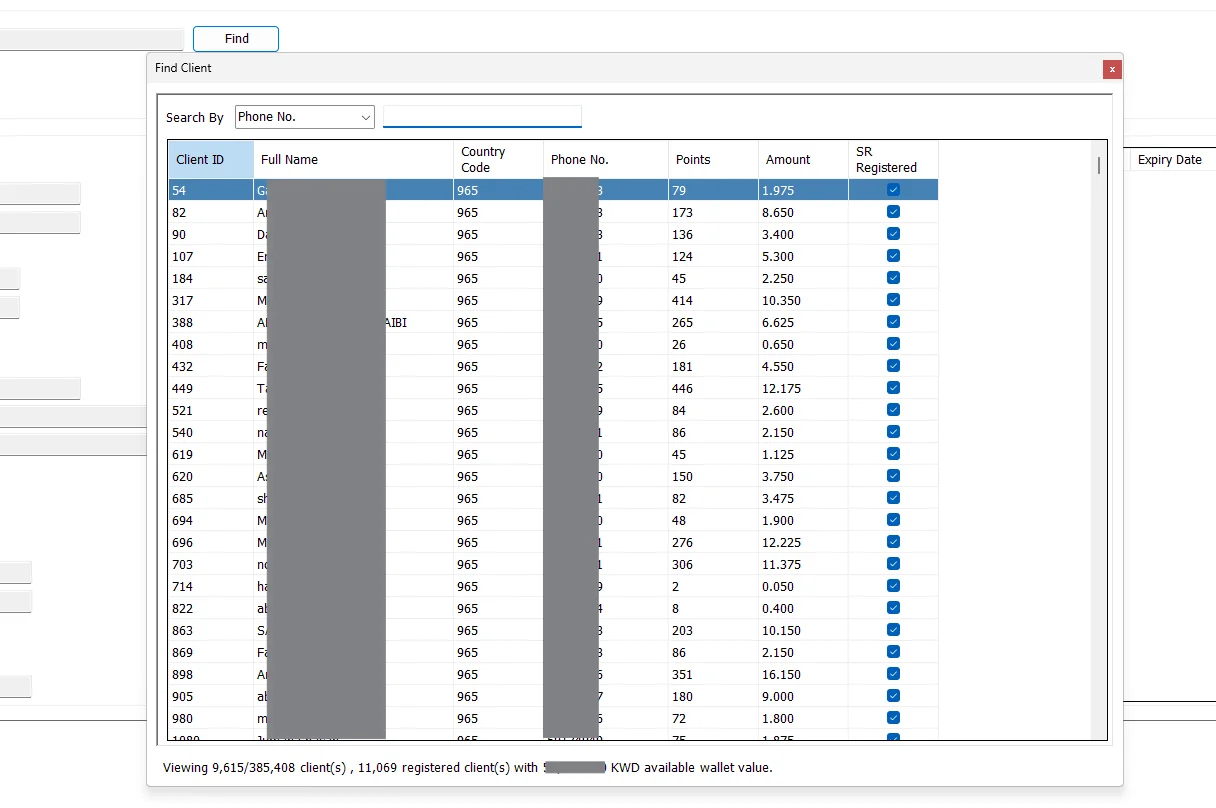
| Exclude Empty Wallets | When selected, the Find Client list includes only clients whose available reward wallet value is not zero. |
| Exclude Non Registered Clients | When selected, only clients registered in Star Rewards are shown. |
| Both selected | Only registered Star Rewards clients with a non-zero wallet value are shown. |
| Search by ID | Matches one exact client ID. |
| Search by Full Name | Finds clients whose full name contains the entered text. |
| Search by Phone No. | Finds clients whose mobile number contains the entered digits. This is the default search method. |
After a client is selected, IMS fills the Account Information section. These fields are read-only; Star Rewards History is intended for enquiry and investigation rather than editing the client.
| Field | Meaning |
|---|---|
| ID | IMS loyalty customer ID. |
| First Name / Last Name | Client name stored in the loyalty profile. |
| Gender | Displayed as Male or Female from the stored gender code. |
| Date Of Birth | Client date of birth when recorded. |
| Nationality | Country name linked to the client's nationality. |
| Language | Preferred language shown as English, Arabic, or Other. |
| Mobile No. | Country code and mobile number. |
| Email Address | Client email address. |
| Home Address | Client home address when available. |
| Registered in Star Rewards | Shows whether the client is registered in the Star Rewards program. |
| Star Rewards Profile Completed | Shows whether the Star Rewards profile has been marked complete. |
| Current Tier | The client's current loyalty tier. |
| Last Trans. Date | Date of the client's most recent recorded Star Rewards transaction. |
| Reward Point | Current reward-point balance. |
| Total Earned | Total reward points earned by the client. |
| Wallet Amount | Current reward wallet value displayed in the local currency. |
The Transactions grid is sorted with the most recent Star Rewards transactions first. It shows where and when the transaction occurred, how many points and what amount were involved, and the status of the points.
| Column | Meaning |
|---|---|
| Store Name | Store associated with the loyalty transaction. |
| Inv. No | Invoice or reference number associated with the transaction, when available. |
| Inv. Date / Inv. Time | Date and time of the Star Rewards transaction. |
| Trans. Type | Sales Trans., Redeem Points, Send Points, or Receive Points. |
| Points | Number of reward points involved in the transaction. |
| Amount | Monetary amount associated with the transaction. |
| Description | Description stored with the reward transaction. |
| Points Status | Applied when the transaction is no longer pending; otherwise Pending. |
| Expiry Date | Expiry date of the points when one is recorded. |
| Using Status | For Sales transactions, shows Available or Redeemed / Canceled. Other transaction descriptions leave this field blank. |
| Displayed type | Purpose |
|---|---|
| Sales Trans. | Points activity created from a sales transaction. |
| Redeem Points | Points redeemed from the client's rewards balance. |
| Send Points | Points transferred out from the client. |
| Receive Points | Points transferred into the client. |
The loyalty transaction is no longer pending and has been applied to the rewards history.
The loyalty transaction is still marked as pending.
For a Sales transaction, the associated reward value has not been used.
For a Sales transaction, the associated reward value is marked as already used or canceled.
Star Rewards History is a read-only enquiry screen. It does not provide the standard Export To Excel, Send By Email or Save As toolbar used by many IMS reports, and it does not edit the client's profile or reward transactions.
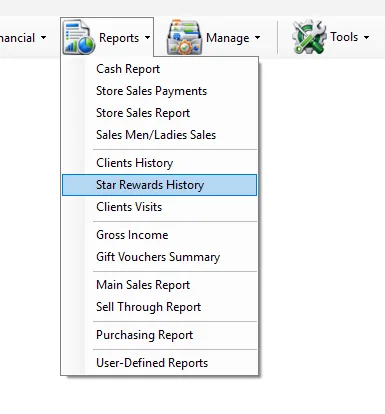
The Star Rewards History menu is permission controlled. If it is not visible in the Reports menu, the logged-in user's IMS policy does not grant access to the Star Rewards client-history function.
Find the client and review Reward Point and Wallet Amount in Account Information.
Review Points Status, Expiry Date and Using Status in the transaction history.
Check Registered in Star Rewards, Profile Completed and Current Tier.
Use the transaction list to review sales, redemptions, points sent and points received in date/time order.